
Generate real test files at any exact size
PDF, PNG, DOCX, ZIP - 30 formats in all, and every one is a real file that opens in the software that owns it, at exactly the size you asked for. Each run also writes down what your application is supposed to do with each file. Command line and desktop window, free and open source, working entirely on your machine.
Free and open source, GPL-3.0. Nothing to sign up for. The Windows and macOS downloads are signed and start without a warning.
-
30
real formats, each one opening in the software that owns it
-
1 byte
the accuracy of every size you ask for, never rounded in silence
-
0
connections to anywhere - no account, no telemetry, no update check
The problem
Making one test file is easy. Making the right thousand is the tedious part
You are testing software that accepts files from people. Sooner or later you need:
- a PDF of exactly 10 MB, to find out whether the upload limit is real
- the three files that sit either side of that limit, to catch off by one errors
- 10,000 log files, to see what the nightly job does when the folder is big
- a ZIP that genuinely holds 200 documents, not a stub with the right extension
- a 4 GB file, without keeping a 4 GB file in your repository
- the same fixtures on your laptop and on the build server, byte for byte
That is what this replaces. It is built for QA engineers, test automation, and anyone whose code has an upload form, an import routine, a parser or a storage quota behind it.
What makes it different
Other generators stop at the bytes. This one answers what your test actually asks
A folder of files still leaves you deciding what each one is supposed to prove. Every run here
writes a manifest.json beside the files - a plain list of everything produced, and
for each entry a declared expectation.
Say your upload endpoint allows 1 MB. Ask for the three files that sit on that line:
tfg generate --preset size-boundaries --limit 1mb --spread 1B --format pdf --out ./edges| File | Bytes | Your system should | Because |
|---|---|---|---|
1mb_under_1b.pdf | 1048575 | accept it | it is inside the limit |
1mb_at_limit.pdf | 1048576 | accept it | the limit itself is allowed |
1mb_over_1b.pdf | 1048577 | reject it | size_limit |
Three files, three different answers, in machine readable form. Your test reads the manifest instead of you hand writing the assertions:
import json, os

directory = "edges"
manifest = json.load(open(os.path.join(directory, "manifest.json")))

for entry in manifest["files"]:
    response = upload(os.path.join(directory, entry["path"]))
    outcome = entry["expected"]["outcome"]
    if outcome == "accept":
        assert response.ok, entry["path"]
    elif outcome == "reject":
        assert not response.ok, entry["path"]
Where the answer depends on your own policy, the manifest says so
It records unspecified rather than inventing an expectation. A generator that
guesses produces false failures, and a suite that cries wolf gets switched off.
Presets
Pick the question, get the whole set
A preset is a set of test files designed around one testing question, so you do not have to work out which files prove what. Each one has a page saying what it usually finds, what is in the set and every setting it takes.
-
Does a file that is valid and as small as the format allows get through?
empty-and-minimal -
Will my system store, show and give back a file name it did not expect?
filename-handling -
Is a size limit enforced exactly where it is declared?
size-boundaries -
Does my table import survive what real tools export?
tabular-import -
Does my reader know which encoding a file is in, or is it guessing?
text-encoding -
Does my upload form take what it should and turn the rest away?
upload-validation
Quick start
Three commands to see it working
-
Make a file
One PNG, exactly two megabytes:
tfg generate --format png --size 2mb --out ./fixtures -
Make a lot of files
Ten thousand log files, each between one and eight kilobytes, with the sizes drawn from the seed so tomorrow gives the same set. Give each run its own directory - the manifest is the only record of what a run wrote, so the tool refuses to write a second one over it:
tfg generate --format log --size-range 1kb-8kb --count 10000 --out ./logs -
Check them, then remove them
verifytells you nothing moved.cleanupremoves exactly what was written and nothing else:tfg verify ./logs/manifest.json tfg cleanup ./logs/manifest.json --yes
Sizes count in 1024s, the way your file manager does, so 2mb means 2097152 bytes.
A plain byte count works too. The documentation covers recipes, the manifest
and the exit codes.
What you get
Built for a suite that runs unattended
-
Exact size, to the byte
Ask for 10485761 bytes and get exactly that. A size a format cannot reach is an error with a reason, never a file of the wrong size.
-
30 real formats
Not padded zeros with an extension. A generated PNG opens in an image viewer, a DOCX opens in Word, a ZIP extracts. Each one is checked against independent readers before it ships.
-
A manifest that is a test oracle
Path, size, SHA-256, format, seed, tool version - and what your system should do with the file.
-
Reproducible
Same recipe and seed, same bytes, on any machine. Commit a small YAML recipe instead of large binary fixtures.
-
Two interfaces, one engine
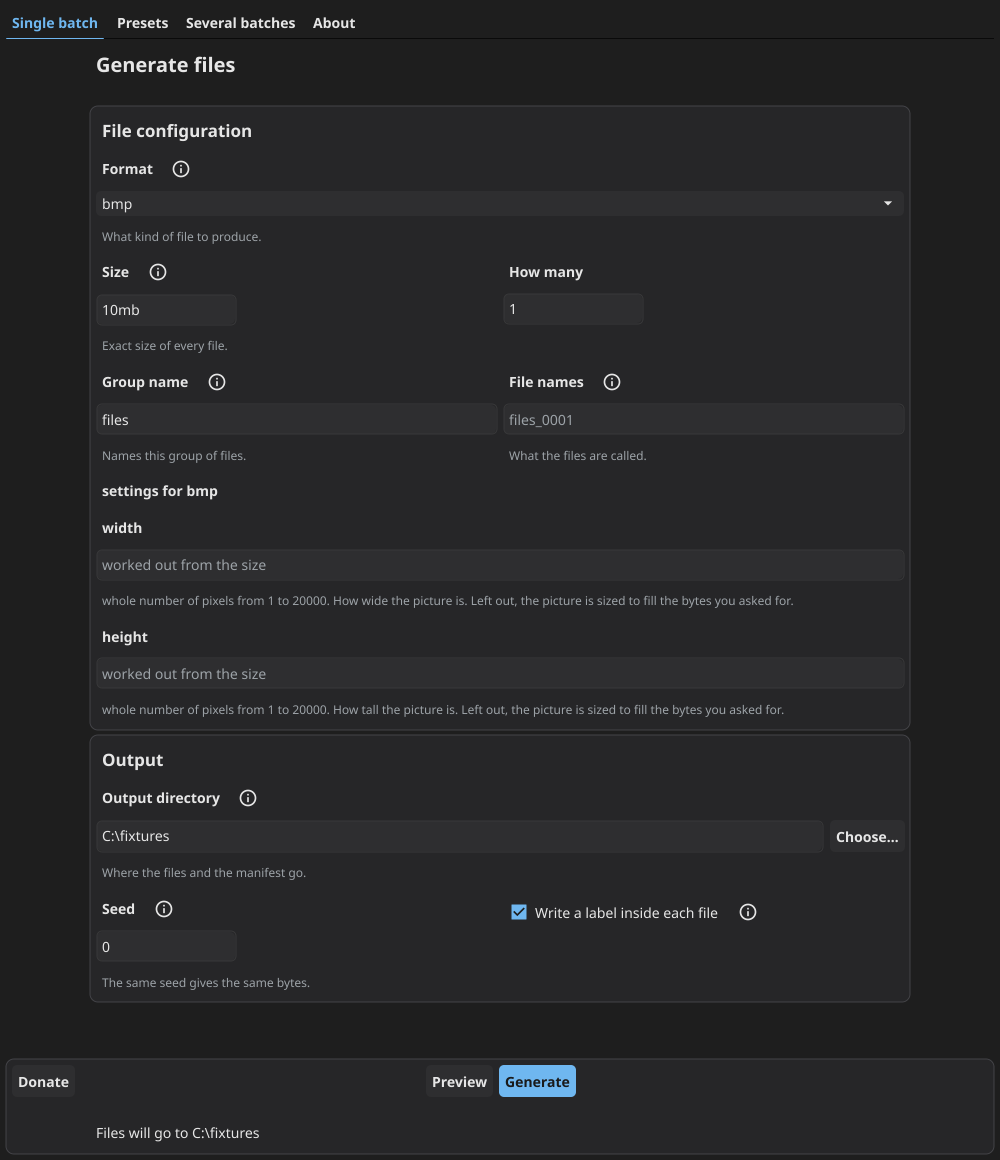
A command line built for CI and a desktop window for exploratory testing. Neither is a cut down version of the other, and a test compares them capability by capability.
-
Completely offline
No account, no cloud, no telemetry, no update check. The command line binary has no network stack compiled into it at all.
Download
Pick the build for your system
Unpack the archive and run it. tfg is the command line and tfg-gui is the
desktop window. There is no installer and nothing to add to your machine.
| System | Command line | Desktop window |
|---|---|---|
| Windows | amd64, arm64 |
amd64 |
| Linux | amd64, arm64 |
amd64 |
| macOS | arm64 |
arm64 |
What is signed, and what is not
The Windows and macOS downloads are signed, so they start without a warning about an unknown
developer. The Linux ones are not, because desktop Linux has no equivalent to sign them with.
Every archive is listed in verify-SHA256SUMS.txt on the release page,
so you can check what you downloaded.
Free and open source, GPL-3.0. Nothing to sign up for. The Windows and macOS downloads are signed and start without a warning.